In the world of digital content creation, screen recording tools are essential for creating tutorials, presentations, product demos, and more. Two popular options in this space are Screen Studio and CleanShot X. Both tools are well-regarded for their feature sets, but which one is the right choice for you?
Let’s break down their capabilities and help you decide which screen recorder is the best fit for your needs.
Overview of Screen Studio

Screen Studio is a highly versatile screen recording software designed for content creators, educators, and professionals who need to create polished video presentations. It offers powerful features that go beyond simple screen capture, making it ideal for those who want to produce high-quality videos with minimal effort.
Overview of CleanShot X
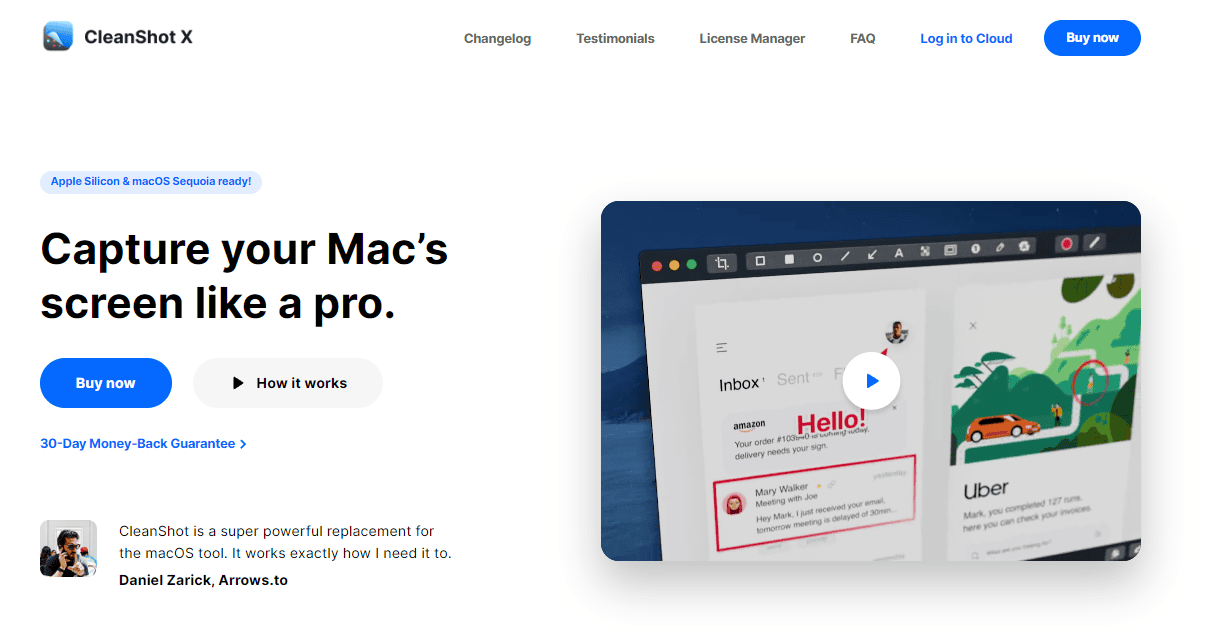
CleanShot X is an all-in-one screen capture and recording tool for macOS that focuses on simplicity and productivity. It offers a wide range of screen capture options, including static screenshots, GIFs, and video recordings. CleanShot X is popular among users who prioritize quick, clean, and customizable screen capture solutions without needing overly complex features.
Key Features of Screen Studio:
- HD and 4K recording: Record high-definition videos in 1080p and 4K resolution, ensuring that every detail on your screen is captured with clarity.
- Customizable recording area: Choose whether to record the full screen or just a specific window or region.
- On-screen drawing tools: Use annotation tools to draw, highlight, and add text while recording, perfect for tutorials and presentations.
- Webcam overlay: Include your webcam feed in your screen recordings, making it easy to add a personal touch to educational or tutorial content.
- Green screen effects: Replace your background using chroma key technology, enabling more professional-looking videos.
- Easy editing: Cut, trim, and enhance your videos without needing to switch to an external editor.
Key Features of CleanShot X:
- Screen recording and GIF creation: Record your screen as a video or create GIFs with minimal effort.
- Screenshot annotations: After capturing screenshots, easily add text, arrows, highlights, and more.
- Scrolling capture: Capture entire webpages or documents that extend beyond the visible screen.
- Instant sharing: Share your recordings and screenshots via links without downloading, thanks to CleanShot Cloud integration.
- Do Not Disturb mode: Disable notifications and desktop clutter while recording to ensure distraction-free captures.
- Static capture mode: Ideal for precise screenshots and annotations for documentation or feedback.
Key Differences
- Focus: Screen Studio is more focused on screen recording with advanced features like audio recording and editing. CleanShot X is primarily a screen capture tool with added recording functionality.
- Features: Screen Studio offers a wider range of features, including time-lapse recording and video editing. CleanShot X is simpler and more streamlined, focusing on fast and efficient capture.
- Price: Screen Studio is generally priced higher due to its extensive feature set. CleanShot X is often more affordable, especially for basic users.
Value & Price: Locating the Sweet Spot
Screen Studio Pricing Plans:
Screen Studio offers both subscription-based and one-time payment options. Depending on your usage and preference, you can opt for a monthly subscription or pay once for lifetime access.
- Lifetime Plan:
- Price: $89
- Features:
- Use on 1 macOS device.
- Pay once and use it forever (Lifetime access).
- Access to all Screen Studio features.
- 1 year of updates.
- Subscription Plan:
- Price: $189
- Features:
- All Screen Studio features
- Lifetime updates
- 3 personal macOS devices
CleanShot X Pricing Plans:
CleanShot X offers two main pricing options:
- Lifetime Plan – App + Cloud Basic :
- A one-time payment of $29. This includes the Mac app, a year of updates, and 1 GB of cloud storage.
- Subscription Plan – App + Cloud Pro: $8 per user/month (billed annually) or $10 per user/month (billed monthly):
- This plan includes access to the Mac app for all users, unlimited cloud storage, custom domain and branding, and advanced security features.
There are also discounts available for students and PixelSnap 2 users.
Screen Studio: The Good and The Bad
Pros
- Excellent for creating professional-grade content.
- Advanced features like annotations and webcam integration.
- 4K recording quality for crisp and detailed videos.
- User-friendly interface with minimal learning curve.
Cons
- Limited export options.
- May not be necessary for users looking for simple screen recordings.
CleanShot X: The Good and The Bad
Pros
- Simple, intuitive interface.
- Excellent for quick screen recordings, screenshots, and annotations.
- CleanShot Cloud offers fast sharing options.
- Lightweight and non-intrusive on system performance.
Cons
- Video recording features are more basic compared to Screen Studio.
- No advanced editing options like webcam integration or green screen.
Feature Comparison: Screen Studio vs CleanShot X
| Feature | Screen Studio | CleanShot X |
|---|---|---|
| Recording Quality | 1080p and 4K | 1080p |
| Webcam Integration | Yes | No |
| Green Screen Effects | Yes | No |
| On-Screen Annotation Tools | Yes | Yes (for screenshots, not during videos) |
| Editing Capabilities | Built-in basic editing | Limited editing options |
| Sharing Options | Downloadable files | CleanShot Cloud (instant sharing links) |
| Scrolling Capture | No | Yes |
| Annotations | Text, shapes, real-time effects | Text, arrows, and highlight tools |
| Ease of Use | Beginner-friendly interface | Intuitive with a minimalistic UI |
Which Screen Recorder Should You Choose?
Choose Screen Studio If:
- You are a content creator, educator, or professional who needs high-quality video recording with advanced features like webcam overlays, green screen effects, and 4K recording.
- You want to annotate your screen in real-time, which is especially useful for tutorials, online courses, and presentations.
- You need a robust tool with built-in editing capabilities and support for multiple platforms (Windows and macOS).
Choose CleanShot X If:
- You prioritize simplicity and speed when capturing screens and creating quick videos or GIFs.
- You often work with screenshots and annotations for feedback, documentation, or sharing with teams.
- You want a lightweight tool that doesn’t drain your system resources, especially if you are primarily focused on static captures or short video clips.
- You prefer a one-time purchase rather than a subscription.
Let's Know User Experience
Screen Studio:
Diyanno J. (Content Creator)
- Rating: ⭐⭐⭐⭐⭐
- Review: “Screen Studio has been a game-changer for my online tutorials. The 4K resolution support ensures that my videos are clear and professional-looking. The interface is super user-friendly, making it easy to start recording quickly. The audio recording capabilities are also top-notch, allowing me to capture both system and microphone audio seamlessly. Highly recommend for anyone needing high-quality screen recording!”
CleanShot X:
Rock S. ( Online Instructor)
- Rating: ⭐⭐⭐⭐⭐
- Review: “CleanShot X is a game-changer for my workflow. The high-resolution captures and built-in editing tools have made creating professional-quality screenshots and videos so much easier. The cloud integration feature is a huge bonus, allowing me to access and share my files instantly. Absolutely love it!”
My Final Words: Screen Studio or CleanShot X?
Both Screen Studio and CleanShot X excel in different areas, and the right choice depends on your specific needs. If you are a content creator or educator looking for a powerful screen recording tool with advanced features, Screen Studio is the better option. However, if you are a macOS user who prioritizes simplicity and needs a tool for quick captures and clean annotations, CleanShot X is the perfect fit.
Consider your workflow, the type of content you produce, and the features you need to make the best decision. Both tools offer exceptional value, but each caters to different audiences.
Finally, I would like to give you thanks for staying with us. If you want to get more content from us, I’d recommend checking out our website MSB Digital.